Showing posts with label social media. Show all posts

May 19, 2017

Twitter advices

How to grow your site/blog


May 11, 2017

How can I get verified on all the social media?


Certain steps allow to have a verified account on a social network. It will then be marked with a badge, visible to the users on the profile or page of the brand or personality.
Note: the approach is not systematically offered to professionals or personalities. In this case, it is advisable to make a link between the social network and the official website, in order to better guide Internet users.

accounts on facebook, twitter, pinterest

Here are the steps to certify your accounts on social networks Twitter, Facebook, Pinterest and Instagram.

Certificate my Twitter account
Recently, Twitter now allows its users to apply for certification. This request can be made for a person, or an activity (like your blog, your business, in short ... a brand).
Certification for a person must include:
• At least two links about you (your blog, a Wikipedia page, etc.);
• A motivational text explaining why you should be certified;
• One copy (face and back) of your identity card;
For the certification form, this happens on a new form available on Twitter: verification.twitter.com/request. To learn more about Twitter certification, visit: support.twitter.com/articles/20174920.

Certify my Facebook account
For Facebook, it's a little faster. If the category of your Facebook page is "Local Businesses" or "Businesses and Organizations", your page may get a gray check badge. If you are an administrator, and your page has profile and coverage photos and can be verified, the option appears in the settings on your page.
To have your page checked, you can use the listed telephone number or a document from your company (for example, a telephone bill). Facebook will only use this information to verify your page.
• Click on "Settings" at the top of your page
• In "General", click "Check Page"
• Click "Check This Page", then click "Start"
• Enter a phone number listed for your business, country, and language
• Click "Call Me Now" to allow Facebook to give you a verification code
• Enter the four-digit verification code and click "Continue"
If you prefer to check your page using a corporate document, follow the steps above and click Check this page instead with documents at the bottom left of the window that appears on the screen. Then import a photo of an official document with the name and address of your business.

Certify my Pinterest account
Since 2012, Pinterest may post the website as certified. On the page, a red acronym to the right of the URL of the website highlights the relationship between the Pinterest account and the official site. This solution is especially recommended for companies who want to link their profile to Pinterest and the official website.
The process involves the integration of an HTML file or a validation meta tag on the company's website:
• Click on "Settings"
• In the "Profile" section, enter your website
• Then, click "Confirm Website"
• Download the custom HTML file and place it at the root of the site, or add the given "meta tag" and insert it in the HTML code of your site
• Click on "Finish" to validate the process
The validation logo appears within a few minutes.

Certify my Instagram account

The audited accounts are allocated by the social network to certain personalities and international brands. It is not currently possible to ask for an audit yourself, but the process could evolve.
Only the Instagram accounts for which the probability of identity spoofing is strong currently have this type of badge. Pending the deployment of audited accounts, the application offers users to post a link to their website or Facebook page on their Instagram profile. It is also possible to integrate an Instagram image stream on an official Facebook page or the company's website.
Facebook pages that have a badge checked do not necessarily have the same type of badge on their Instagram account.

Nov 12, 2016

Read and learn - FREE e-books

Searching on the net, I have discover sommes actionable marketing ebooks released this year.
These actionable gems may not be totally free, but we think they’re more than worth trading your email for.
So sit back, pour yourself some eggnog, release your not-so-inner-nerd — and prepare to rock your marketing in the new year.

What to expect:
  • Tactics for keeping your evergreen content alive on social platforms
  • Tips for catering your messaging to each unique social media platform
  • Testing ideas for the placement of social share buttons on your website
read more...


Sep 9, 2016

How to get more Social Shares

Bildschirmfoto 2016-09-02 um 14.28.25
Source: https://blog.thesocialms.com


 What You Can Do Now To Get More Social Shares?


The Social MS blog view:
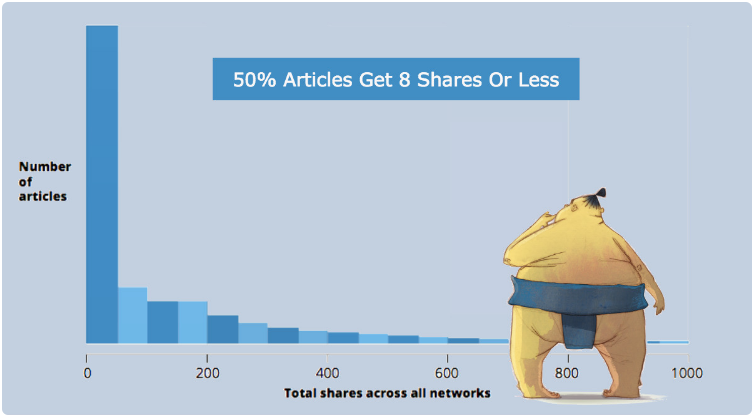
Does it come as a surprise that on average a piece of content gets less than 8 social shares? Of course, that includes all the crappy pieces that you would never share, and it also includes all the great pieces on blogs no one knows about.

Here are some reminders and hacks for you to make sure that your content gets a lot more shares on social media:

1. Have Share Buttons

2. Make share buttons easy to find

3. Make sure the social media update is perfect

 Read more about social shares with a simple click Here!


Jun 9, 2016

Social Media Isn’t Working?

Social media isn’t dead – it’s just fed up with how it’s being abused. There’s a gap between how marketers use social media and how consumers consume social media content, so I’ve listed here five practices for social media use that I am trying to embrace.

social media
Source: http://www.ducttapemarketing.com/blog

 A recent study by Social Fresh, called the Future of Social Media, showed that the primary goal of social media for 76% of those surveyed was to create awareness.

If you seek to take advantage of the awesome potential of social media you, have to do some work. This has always been true, but in the early days, you could afford some laziness if you were an early adopter.

  Today there are five practices for social media use that I’m am trying to embrace and that I am advising anyone that will listen to embrace. (I could also write the flip side piece as five social media bad habits you must break.)
  
 Read more at Duct Tape Marketing

Watch also this video:
 

Jun 3, 2016

Free Template Every Marketer Needs

FROM THE HUBSPOT MARKETING BLOG ARCHIVES
 
The Social Media Content Calendar Template Every Marketer Needs [Free Template]
 Scrambling for social content is not a new phenomenon. We have meetings. We run late. Things come up. And it's really hard to get any meaningful amount of work done when you have the next social media update looming over your head every 30, 60, or 90 minutes. That's why we created this template. 
social-media-content-calendar.png
Source: http://blog.hubspot.com/blog/

A few years ago, Hubspot created a social media content calendar template to help, which they recently updated to be better, faster, stronger, and just generally prettier. You can fill it in at the same day and time every single week to prep for the following week's social media content. That means when you burst through the office doors at 9 a.m., you won't be in panic mode looking for something to push out to your Facebook fans -- you already took care of that last week.


How to Use the Social Media Calendar to Plan Your Content Schedule

When you open up the social media content calendar template, you'll notice the bottom of the Excel spreadsheet has several different tabs, most of which are dedicated to a specific social network.
The reason you'll want a different worksheet for every social network is simply that every social network is a little bit different. You can't just craft one, single social media update and use it across LinkedIn, Facebook, Twitter, Instagram, Pinterest, and Google+. You can certainly promote the same piece of content across all six of those networks, but that doesn't mean you'll craft your update in the same way for every single one of them. (In fact, you may even want to add additional tabs if you're active on other networks, like Quora or YouTube.)

Download the free social media content calendar template here. Then learn how to use it in this post.


 Watch also this video:

May 26, 2016

How To Choose Your Social Channels

It is a bad idea to try to be active in each and every possible social media channel. Especially when you are starting out.
So how do you select the social media channels that are right for you?

10 Questions To Ask Before You Start

How to determine the best social channels to be active in and 10 questions to help you find the optimal answer for your special situation.
Source: https://blog.thesocialms.com

 The size of a social network measured in active users is not the most important factor when it comes to the decision, which networks you should use.
Here are some questions you need to ask yourself and answer before you decide on the networks you are going to use for your social media marketing.

Where is your target audience?

Where are your customers looking for you?

Where are your competitors?

Which content type would you use?

And 6 more questions wich you can read HERE about Social Media Channels.

Bildschirmfoto 2016-05-19 um 11.42.05
Source: https://blog.thesocialms.com/choose-social-channels-questions-ask/
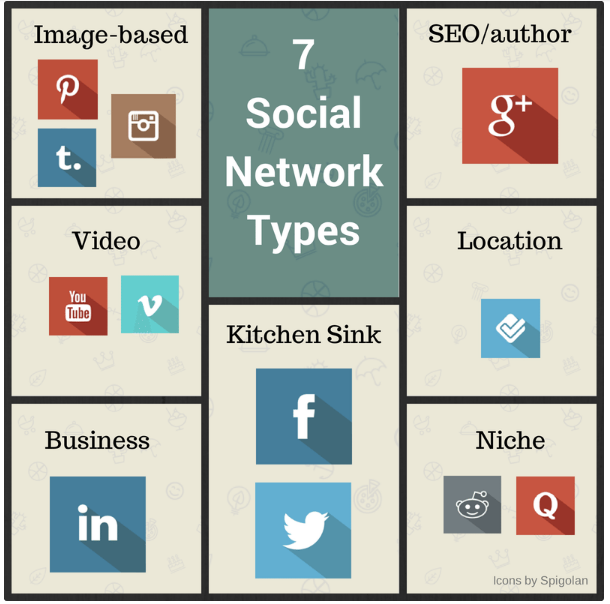
Here are 10 of the biggest social networks this year and what you should really spend your time posting on them.


May 24, 2016

Discover Social Media Secrets

  • This picture depicts social media as a way people gather their information from all around the world and share their experiences. www.phoenixfocus.com/2012-02/social-media-news/
  • 10 top social media marketing success stories - CIO
    CIO10 top social media marketing success storiesCIOUpstarts such as Cards Against Humanity and iconic companies including Burberry are getting much more creative with social media. These 10 recent campaigns from the past year are examples of how quirky, unique and even risky social media marketing ...
  • For brands, your Instagram feed is better than Vogue or Time - CNBC
    CNBCFor brands, your Instagram feed is better than Vogue or TimeCNBCA new study by TapInfluence found that social media influence marketing is 11 times more effective than banner ads, meaning that social media accounts with wide followings, so-called "influencers," are coveted by companies looking to reach plugged-in ...
  • Do you use social media to market your business? There's bit of etiquette you should be familiar with. Here are 10 points. Read more: ...
  • 3 Most Common Mistakes Social Media Marketers Are Committing In 2016 - Dazeinfo (blog)
    Dazeinfo (blog)3 Most Common Mistakes Social Media Marketers Are Committing In 2016Dazeinfo (blog)In their quest for greater sales and increased ROI, the self-appointed “digital marketing guru” has lost touch with what social media has evolved into. A game-changer in the field of marketing is social media that brought in groundbreaking changes to ...Does Social Media Marketing Have an Unavoidable Future in Paid Posts?The Content Standard by SkywordA Reminder: Social Media is Not a “Marketing Tool”!Business 2 CommunityIs Instagram Introducing the Infamous 'Boosted Post'?FstopperseMarketerall 29 news articles »
  • 7 Social Media Marketing Secrets No Marketer Wants to Admit - Entrepreneur
    Entrepreneur7 Social Media Marketing Secrets No Marketer Wants to AdmitEntrepreneurWith proper planning and successful execution, social media marketing can be effective for practically any business. In fact, in a survey of 357 marketers that I recently conducted, social media marketing had the highest percentage of respondents (96 ...Social Media Marketing: An effective marketing toolTheSequitur.comROI beyond likes and shares: 5 ways calls validate social ad spendingMarketing Landall 6 news articles »

May 15, 2016

Top 3 "MUST WATCH" Social Experiments of 2015

Top 3 "MUST WATCH" Social Experiments of 2015


10 of The Best Social Media Campaigns of 2015

May 14, 2016

Social Media Influencer at the God's doorstep!

Social Media Influencer at the God's doorstep!

May 12, 2016

Advanced Social Media Strategy That Works

8 Reasons Slideshare Presentations Work Beautifully For Your Marketing

8 Reasons Slideshare Presentations Work Beautifully For Your Marketing
Source: https://blog.thesocialms.com/
Slideshare - you shouldn't ignore this opportunity. Sure Twitter, Facebook, Pinterest and Instagram (and all the others...) are the cool kids on the block - but Slideshare is an amazing opportunity. 

Slideshare is a content marketing giant that flies slightly under the radar. Many bloggers and marketers do not seem to be fully aware of the potential of Slideshare and how they can easily jump right in and get something out of their efforts by “simply“ creating some outstanding slides and uploading them on Slideshare.
Last year, over three years after being acquired by LinkedIn Slideshare rebranded as LinkedIn Slideshare. As a LinkedIn service, it is also possible to easily add your Slideshare presentations to your LinkedIn profile.

Here are a few tips on what Slideshare can do for your marketing and traffic/lead generatio:

Slideshare is huge but not (yet) overcrowded;

Slides can upgrade your content;

Slideshare lets you find a new audience;

Bildschirmfoto 2016-05-09 um 15.22.11
source : https://blog.thesocialms.com/8-reasons-slideshare-works-marketing/

Read more about Slideshare by clicking here.

You can watch this video to learn How to set up and use Slideshare.


May 9, 2016

Need more traffic?

The Beginner’s Guide To More Social Traffic In 8 Simple Steps

The Beginner’s Guide To More Social Traffic (1)
Source: https://blog.thesocialms.com


Many people struggle to get a considerable amount of traffic from social media even if they invest a lot of time (and sometimes money) into this marketing channel. 

Learn how to get traffic from Social Media:


You need an audience
You need to connect
You need more content

CLICK HERE to read more.

Check also this tips 


Apr 29, 2016

How to use Pinteres for your Marketing

 Discover five ways to use Pinterest analytics and improve your Pinterest marketing.

#1: Identify Your Competition
#2: Discover Which Device Your Followers Prefer
#3: Find Out How People Organize Your Content
#4: Discover Your Audience’s Interests
#5: Reveal Your Most Engaging Pins


Apr 20, 2016

How to create content and get Social Shares


The Step by Step Guide to Creating Content That Gets Thousands of Social Shares 

Social shares is an important marketing metric you should be watching to determine if your business is going in the right direction.

content-kpi

Read more here.
The author of this study is Michael Akinlaby, a Content Strategist and SEO Consultant.

Apr 15, 2016

How to monitor Social Media Activity


The 8 Most Important Google Analytics Reports For Social Media Management

The 8 Most Important Google Analytics Reports For Social Media Management 

I just wanted to let you know that there is a new blog post that you should read on our blog. This time, it's all about Google Analytics and how to monitor social media activity via this amazing tool.

Read a guest blog post by Amanda Strouse. Amanda is a social media marketing manager and writer for Bloominari, a leading bilingual digital marketing company located in San Diego, California, that provides business strategy, marketing, content and design solutions for small businesses in San Diego and throughout the country.